How to Create an Invoice in South Africa
A complete guide to creating invoices that get you paid. What to include, how to number them, and the VAT requirements you need to know.
What is an invoice?
An invoice is a document requesting payment for goods or services you have provided. It serves as a legal record of the transaction, a basis for your tax returns, and proof of what was agreed between you and your client.
In South Africa, if you are VAT registered, your invoice must also comply with Section 20 of the Value-Added Tax Act 89 of 1991, making it a “tax invoice” with specific required fields.
10 things every invoice must include
- The word 'Invoice' (or 'Tax Invoice' if VAT registered)
- Your business name, address, and contact details
- Your client's name and contact details
- A unique, sequential invoice number (e.g., INV-2026-001)
- The date the invoice is issued
- A clear description of each good or service provided
- Quantity and unit price for each item charged
- Subtotal, VAT (if applicable), and total amount due
- Your banking details for EFT payment (bank, account number, branch code)
- Payment terms and due date (e.g., 'Due within 30 days')
VAT-registered businesses
If you are VAT registered, Section 20 of the VAT Act requires additional fields: your VAT number, the recipient's VAT number (for invoices over R5,000), amounts excluding VAT, the VAT amount (15%), and the total including VAT. Without these, your client cannot claim input VAT.
Invoice numbering
SARS requires a “serialised number” on tax invoices, meaning each invoice must have a unique, sequential number. Good numbering practices:
- Use a consistent format: INV-001, INV-002 or INV-2026-001
- Never reuse or skip numbers. Gaps raise questions during audits
- Keep a separate sequence for quotes (QT-001) and credit notes (CN-001)
- If you have multiple businesses, use different prefixes for each
wabill assigns sequential numbers automatically, so you never need to track this yourself.
Step-by-step: The traditional way
If you create invoices manually, here is the full process:
- Open a template (Word, Excel, or Google Docs)
- Fill in your business details and logo
- Add your client's name and contact details
- Assign the next invoice number in your sequence
- Set the date and payment terms
- List each item with description, quantity, and price
- Calculate subtotal, add VAT (if registered), calculate total
- Add your banking details
- Save as PDF
- Send to your client via email or WhatsApp
This takes 10 to 15 minutes per invoice and is easy to get wrong, especially the VAT calculation and invoice numbering.
Example invoice
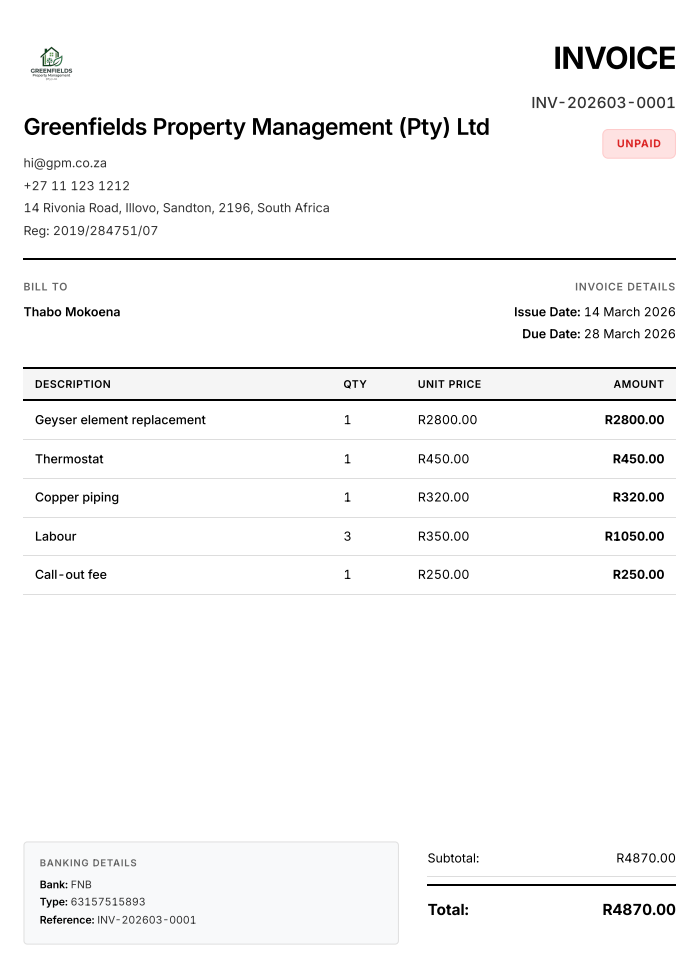
An actual invoice generated by wabill.
Common mistakes that cost you money
- Missing bank details. The number one reason clients delay payment
- Vague descriptions ('Services rendered'). Leads to disputes about what was delivered
- No due date. Clients don't know when to pay, so they don't prioritise it
- Wrong VAT calculation. Overcharging VAT is illegal; undercharging costs you money
- Not invoicing promptly. The longer you wait after completing work, the harder it is to collect
- No copy kept. SARS requires 5 years of records under the Tax Administration Act
Record keeping requirements
South African tax law requires you to keep financial records for 5 years. This is mandated by both the Tax Administration Act 28 of 2011 (Section 29) and, for VAT vendors, Section 55 of the VAT Act. Keep copies of every invoice you issue. Digital PDFs are acceptable.
The fast way: wabill on WhatsApp
Instead of filling in templates, just describe what you need on WhatsApp:
“Invoice Protea Events for website redesign R18,000, content writing R4,000, SEO setup R3,000. Due in 30 days.”
wabill creates a professional PDF invoice with your business details, automatic numbering, VAT calculation, and banking info. Ready to send in 60 seconds. 10 free documents to start, then R150/month.
FAQ
What information must be on a South African invoice?
Every invoice needs: your business name and contact details, client name and details, a unique invoice number, the date, a description of goods or services, quantities and prices, the total amount, your bank details, and payment terms. If VAT registered, add your VAT number and VAT breakdown as required by Section 20 of the VAT Act 89 of 1991.
How do I number my invoices?
Use a sequential system like INV-001, INV-002, or INV-2026-001. Never reuse or skip numbers. SARS requires a 'serialised number' on tax invoices, meaning each number must be unique. wabill handles numbering automatically.
Do I need to charge VAT on my invoices?
Only if you are VAT registered. VAT registration is compulsory once your annual taxable turnover exceeds R1 million. You may voluntarily register if turnover exceeds R50,000. If you are not registered, do not charge or show VAT.
How long must I keep copies of invoices?
SARS requires 5 years of financial records. Section 55 of the VAT Act requires 5-year retention of all tax invoices. The Tax Administration Act 28 of 2011 (Section 29) also requires 5-year record retention for all taxpayers.
What happens if my invoice is missing information?
Incomplete invoices cause delayed payments, disputes, and tax problems. If you're VAT registered and your tax invoice is missing required fields, your client cannot claim input VAT, meaning they may refuse to pay until you reissue it correctly.
10 free documents. No card needed.