Legal requirement
Section 20 of the Value-Added Tax Act 89 of 1991 prescribes what a tax invoice must contain. If you are VAT registered, you must issue tax invoices, and they must include all required fields, or your client cannot claim input VAT.
What must a tax invoice include?
Section 20(4) and 20(5) of the VAT Act set out the required contents. For a full tax invoice (supplies over R5,000 including VAT), you need:
- The words 'Tax Invoice' displayed prominently
- Your name, address, and VAT registration number
- The recipient's name, address, and VAT registration number
- An individual serialised number (invoice number)
- The date the invoice is issued
- A full description of the goods or services supplied
- The quantity or volume of goods (where applicable)
- The value of the supply excluding VAT
- The VAT rate applied (15% standard rate)
- The amount of VAT charged
- The total consideration (amount including VAT)
Full tax invoice vs abridged tax invoice
The VAT Act allows a simplified version for smaller transactions:
Full Tax Invoice (over R5,000 incl. VAT)
Must include all fields listed above, including the recipient's name, address, and VAT number. Required for the recipient to claim input VAT on purchases over R5,000.
Abridged Tax Invoice (R5,000 or less incl. VAT)
Under Section 20(4), the recipient's details are not required. You still need the words “Tax Invoice”, your VAT number, a description, and the VAT-inclusive amount. Common for retail and point-of-sale transactions.
When must you issue a tax invoice?
- When making any taxable supply exceeding R50 to a VAT-registered recipient
- Within 21 days of the supply being made, if the recipient requests one (Section 20(1))
- When a customer requests a tax invoice (even for amounts under R50)
- For zero-rated supplies, the same rules apply. The invoice must state the rate as 0%
VAT registration thresholds
Not every business needs to issue tax invoices. It depends on your VAT registration status:
If you are not VAT registered, you may not charge VAT or issue tax invoices. Doing so is an offence under the VAT Act.
Example: Full tax invoice
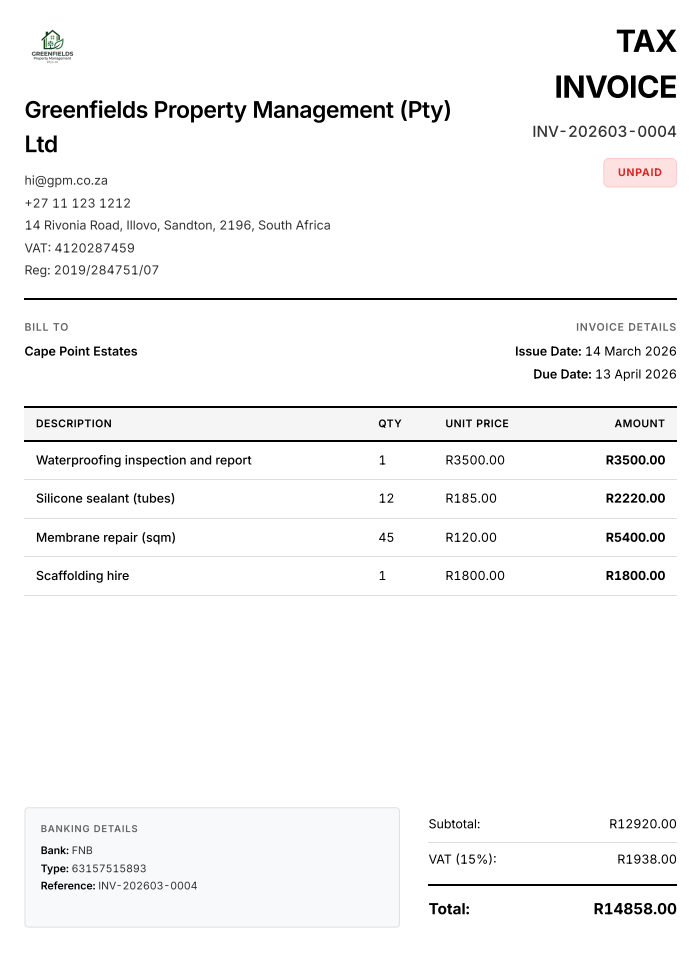
An actual tax invoice generated by wabill.
Common tax invoice mistakes
- Missing the words 'Tax Invoice'. Without this, it is not a valid tax invoice under the Act
- No VAT registration number. Your client cannot claim input VAT without it
- Not showing VAT separately. The amount excluding VAT, VAT amount, and total must all be stated
- Issuing a tax invoice when not VAT registered. This is illegal
- Not keeping copies for 5 years. Section 55 of the VAT Act requires record retention
- Missing recipient details on invoices over R5,000. A full tax invoice requires the buyer's name, address, and VAT number
Record keeping
Section 55 of the VAT Act requires you to keep copies of all tax invoices (issued and received) for a minimum of 5 years. The Tax Administration Act 28 of 2011 (Section 29) echoes this requirement. Digital copies, such as PDF invoices from wabill, are fully acceptable.
Create tax invoices on WhatsApp
Enable VAT in your wabill settings and we handle the rest. Every invoice includes the words “Tax Invoice”, your VAT number, amounts excluding and including VAT, and proper formatting.
“Invoice Naidoo Retail for e-commerce website R45,000, hosting R6,000, training R8,000. Due in 30 days.”
10 free documents. No credit card. Then R150/month for unlimited.
FAQ
What is the difference between a tax invoice and a regular invoice?
A tax invoice is a specific document required by Section 20 of the VAT Act 89 of 1991 when a VAT-registered vendor makes a taxable supply. It must include prescribed fields like VAT numbers, amounts excluding and including VAT, and the words 'Tax Invoice'. A regular invoice is any payment request. It does not need these fields and cannot be used to claim input VAT.
When must I issue a tax invoice?
Section 20(1) of the VAT Act requires you to issue a tax invoice within 21 days of making a taxable supply, if the recipient requests one. You must issue one for any supply exceeding R50 to another VAT vendor.
What is an abridged tax invoice?
Under Section 20(4) of the VAT Act, for supplies of R5,000 or less (including VAT), you may issue an abridged tax invoice. This is a simplified version that does not require the recipient's name, address, or VAT number.
Can I charge VAT if I am not VAT registered?
No. Only a registered VAT vendor may charge VAT. Charging VAT when you are not registered is illegal under the VAT Act and can result in penalties from SARS.
Does wabill create SARS-compliant tax invoices?
Yes. When you enable VAT in your wabill settings, all invoices include the required Section 20 fields: the words 'Tax Invoice', your VAT number, amounts excluding VAT, the VAT amount at 15%, and the total including VAT.
10 free documents. No card needed.